概述
爬虫,应该称为网络爬虫,也叫网页蜘蛛、网络机器人、网络蚂蚁等。
搜索引擎,就是网络爬虫的应用者
为什么到了今天,反而这个词汇被频繁的提起呢?有搜索引擎不就够了吗?
实际上,大数据时代的到了,所有的企业都希望通过海量数据发现其中的价值
所以,需要爬取对特定网站、特定类别的数据,而搜索引擎不能提供这样的功能,因此,需要自己开发爬虫来解决
爬虫分类
通用爬虫
常见就是搜索引擎,无差别的收集数据、存储,提取关键字,构建索引库,给用户提供搜索接口
爬取一般流程
- 初始一批URL,将这些URL放到待爬取队列
- 从队列取出这些URL,通过DNS解析IP,对IP对应的站点下载HTML页面,保存到本地服务器中,爬取完的URL放到已爬取队列
- 分析这些网页内容,找出网页里面的其他关心的URL链接,继续执行第2步,直到爬取条件结束
搜索引擎如何获取一个新网站的URL
- 新网站主动提交给搜索引擎
- 通过其它网站页面中设置的外链
- 搜索引擎和DNS服务商合作,获取最新收录的网站
聚焦爬虫
有针对性的编写特定领域数据的爬取程序,针对某些类别数据采集的爬虫,是面向主题的爬虫
Robots协议
指定一个robots.txt文件,告诉爬虫引擎什么可以爬取
/ 表示网站根目录,表示网站所有目录。Allow 允许爬取的目录Disallow 禁止爬取的目录
可以使用通配符
淘宝 http://www.taobao.com/robots.txt1
2
3
4
5
6
7
8
9
10
11
12
13
14
15
16
17
18
19
20
21
22
23
24
25
26
27
28
29
30
31
32
33
34
35
36
37
38
39
40
41
42
43
44
45
46
47
48
49
50
51
52
53
54
55
56
57
58
59
60
61
62
63User-agent: Baiduspider
Allow: /article
Allow: /oshtml
Allow: /ershou
Allow: /$
Disallow: /product/
Disallow: /
User-Agent: Googlebot
Allow: /article
Allow: /oshtml
Allow: /product
Allow: /spu
Allow: /dianpu
Allow: /oversea
Allow: /list
Allow: /ershou
Allow: /$
Disallow: /
User-agent: Bingbot
Allow: /article
Allow: /oshtml
Allow: /product
Allow: /spu
Allow: /dianpu
Allow: /oversea
Allow: /list
Allow: /ershou
Allow: /$
Disallow: /
User-Agent: 360Spider
Allow: /article
Allow: /oshtml
Allow: /ershou
Disallow: /
User-Agent: Yisouspider
Allow: /article
Allow: /oshtml
Allow: /ershou
Disallow: /
User-Agent: Sogouspider
Allow: /article
Allow: /oshtml
Allow: /product
Allow: /ershou
Disallow: /
User-Agent: Yahoo! Slurp
Allow: /product
Allow: /spu
Allow: /dianpu
Allow: /oversea
Allow: /list
Allow: /ershou
Allow: /$
Disallow: /
User-Agent: *
Disallow: /
明确百度爬虫能爬取的内容1
2
3
4
5
6User-agent: Baiduspider
Allow: /article
Allow: /oshtml
Allow: /ershou
Disallow: /product/
Disallow: /
其它爬虫,不允许爬取1
2User-Agent: *
Disallow: /
马蜂窝 http://www.mafengwo.cn/robots.txt1
2
3
4
5User-agent: *
Disallow: /
Disallow: /poi/detail.php
Sitemap: http://www.mafengwo.cn/sitemapIndex.xml
这是一个君子协定,“爬亦有道”
- 这个协议为了让搜索引擎更有效率搜索自己内容,提供了如Sitemap这样的文件。Sitemap往往是一个XML文件,提供了网站想让大家爬取的内容的更新信息
- 这个文件禁止抓取的往往又是可能我们感兴趣的内容,它反而泄露了这些地址
HTTP请求和响应处理
其实爬取网页就是通过HTTP协议访问网页,不过通过浏览器访问往往是人的行为,把这种行为变成使用程序来访问
urllib包
urllib是标准库,它一个工具包模块,包含下面模块来处理url:
urllib.request用于打开和读写urlurllib.error包含了由urllib.request引起的异常urllib.parse用于解析urlurllib.robotparser分析robots.txt文件
Python2中提供了urllib和urllib2。urllib提供较为底层的接口,urllib2对urllib进行了进一步封装
Python3中将urllib合并到了urllib2中,并更名为标准库urllib包
urllib.request模块
模块定义了在基本和摘要式身份验证、 重定向、 cookies等应用中打开 Url (主要是 HTTP) 的函数和类
urlopen方法
urlopen(url, data=None)
- url是链接地址字符串,或请求类的实例
- data提交的数据,如果data为None发起GET请求,否则发起POST请求。见
urllib.request.Request#get_method - 返回
http.client.HTTPResponse类的响应对象,这是一个类文件对象1
2
3
4
5
6
7
8
9
10
11
12
13
14
15
16from urllib.request import urlopen
# 打开一个url返回一个响应对象,类文件对象
# 下面的链接访问后会有跳转
response = urlopen('http://www.bing.com') # GET方法
print(response.closed)
with response:
print(1,type(response)) # http.client.HTTPResponse 类文件对象
print(2, response.status, response.reason) # 请求状态
print(3, response.geturl()) # 返回真正的URL
print(4, response.info()) # headers
print(5, response.read()) # 读取返回的内容
print(response.closed)
执行结果1
2
3
4
5
6
7
8
9
10
11
12
13
14
15
16
17
18
19
20
21
22
23
24
25
26
27
28
29D:\python\venvs\blog01\Scripts\python.exe D:/python/blog-1.0/text.py
False
1 <class 'http.client.HTTPResponse'>
2 200 OK
3 http://cn.bing.com/
4 Cache-Control: private, max-age=0
Content-Length: 114009
Content-Type: text/html; charset=utf-8
Vary: Accept-Encoding
P3P: CP="NON UNI COM NAV STA LOC CURa DEVa PSAa PSDa OUR IND"
Set-Cookie: SRCHD=AF=NOFORM; domain=.bing.com; expires=Mon, 26-Jul-2021 09:29:04 GMT; path=/
Set-Cookie: SRCHUID=V=2&GUID=DCAB9EC86F964A45A890787A7EF4CF93&dmnchg=1; domain=.bing.com; expires=Mon, 26-Jul-2021 09:29:04 GMT; path=/
Set-Cookie: SRCHUSR=DOB=20190726; domain=.bing.com; expires=Mon, 26-Jul-2021 09:29:04 GMT; path=/
Set-Cookie: _SS=SID=10B11589C8FA6E3003FE182CC9D46F33; domain=.bing.com; path=/
X-MSEdge-Ref: Ref A: EAB1A96DB5534F5DB9BBD28A6BD85086 Ref B: BJ1EDGE0112 Ref C: 2019-07-26T09:29:04Z
Set-Cookie: _EDGE_S=F=1&SID=10B11589C8FA6E3003FE182CC9D46F33; path=/; httponly; domain=bing.com
Set-Cookie: _EDGE_V=1; path=/; httponly; expires=Wed, 19-Aug-2020 09:29:04 GMT; domain=bing.com
Set-Cookie: MUID=2169749B8FF26D6034DC793E8EDC6CF3; path=/; expires=Wed, 19-Aug-2020 09:29:04 GMT; domain=bing.com
Set-Cookie: MUIDB=2169749B8FF26D6034DC793E8EDC6CF3; path=/; httponly; expires=Wed, 19-Aug-2020 09:29:04 GMT
Date: Fri, 26 Jul 2019 09:29:03 GMT
Connection: close
5 b'<!DOCTYPE html><html lang="zh"><script type="text/javascript" >//<![CDATA[\r\nsi_ST=new Date\r\n//]]></s'
···
···
True
Process finished with exit code 0
上例,通过urllib.request.urlopen方法,发起一个HTTP的GET请求,WEB服务器返回了网页内容。响应的数据被封装到类文件对象中,可以通过read方法、readline方法、readlines方法获取数据,status和reason属性表示返回的状态码,info方法返回头信息,等等
User-Agent问题
上例的代码非常精简,即可以获得网站的响应数据。但目前urlopen方法通过url字符串和data发起HTTP的请求
- 如果想修改HTTP头,例如useragent,就得借助其他方式
源码中构造的useragent如下1
2
3
4
5# urllib.request.OpenerDirector
class OpenerDirector:
def __init__(self):
client_version = "Python-urllib/%s" % __version__
self.addheaders = [('User-agent', client_version)]
当前显示为 Python-urllib/3.6
有些网站是反爬虫的,所以要把爬虫伪装成浏览器。随便打开一个浏览器,复制浏览器的UA值,用来伪装
- UA值获取方式:

Request类
Request(url, data=None, headers={}) - 初始化方法,构造一个请求对象
- 可添加一个header的字典
- data参数决定是GET还是POST请求
add_header(key, val) 为header中增加一个键值对1
2
3
4
5
6
7
8
9
10
11
12
13
14
15
16
17
18
19
20
21
22
23
24
25
26
27
28
29
30
31
32
33
34
35
36from urllib.request import urlopen, Request
from http.client import HTTPResponse
import random
# 打开一个url返回一个Request请求对象
# url = 'https://movie.douban.com/' # 注意尾部的斜杠一定要有
url = 'http://www.bing.com/'
ua_list = [
"Mozilla/5.0 (Windows NT 6.1; Win64; x64) AppleWebKit/537.36 \
(KHTML, like Gecko)Chrome / 57.0.2987.133 Safari / 537.36",# chrome"
"Mozilla/5.0 (Windows; U; Windows NT 6.1; zh-CN) AppleWebKit/537.36\
(KHTML, like Gecko)Version / 5.0.1 Safari / 537.36", # safafi
"Mozilla/5.0 (Windows NT 6.1; Win64; x64; rv:50.0) Gecko/20100101 Firefox/50.0",# Firefox
"Mozilla/5.0 (compatible; MSIE 9.0; Windows NT 6.1; Trident/5.0)" # IE
]
ua = random.choice(ua_list) # pick one
# ua需要加到请求头中
request = Request(url)
request.add_header('User-Agent', ua)
print(type(request))
response:HTTPResponse = urlopen(request, timeout=20) # request对象或者url都可以
print(type(response))
with response:
print(1,response.status, response.getcode(), response.reason) # 状态,getcode本质上就是返回status
print(2, response.geturl()) # 返回数据的url。如果重定向,这个url和原始url不一样
# 例如原始url是http://www.bing.com/,返回http://cn.bing.com/
print(3, response.info()) # 返回响应头headers
print(4, response.read()) # 读取返回的内容
print(5, request.get_header('User-agent'))
print(6, request.headers)
print(7, 'user-agent'.capitalize())
执行结果
urllib.parse模块
该模块可以完成对url的编解码
先看一段代码,进行编码1
2
3
4
5
6
7
8
9
10
11
12
13
14
15
16
17
18
19
20from urllib import parse
u = parse.urlencode('https://www.bing.com/search')
# 运行结果如下
Traceback (most recent call last):
File "C:\Users\mayn\AppData\Local\Programs\Python\Python36\Lib\urllib\parse.py", line 854, in urlencode
raise TypeError
TypeError
During handling of the above exception, another exception occurred:
Traceback (most recent call last):
File "D:/python/blog-1.0/text.py", line 3, in <module>
u = parse.urlencode('https://www.bing.com/search')
File "C:\Users\mayn\AppData\Local\Programs\Python\Python36\Lib\urllib\parse.py", line 862, in urlencode
"or mapping object").with_traceback(tb)
File "C:\Users\mayn\AppData\Local\Programs\Python\Python36\Lib\urllib\parse.py", line 854, in urlencode
raise TypeError
TypeError: not a valid non-string sequence or mapping object
urlencode函数第一参数要求是一个字典或者二元组序列1
2
3
4
5
6
7
8
9
10
11
12from urllib import parse
u = parse.urlencode({
'url':'https://www.bing.com/search',
'p_url':'https://cn.bing.com/search?q=豆瓣&qs=n'
})
print(u)
# 运行结果如下
url=https%3A%2F%2Fwww.bing.com%2Fsearch&\
p_url=https%3A%2F%2Fcn.bing.com%2Fsearch%3Fq%3D%E8%B1%86%E7%93%A3%26qs%3Dn
从运行结果来看冒号、斜杠、&、等号、问号等符号全部被编码了,%之后实际上是单字节十六进制表示的值
- 一般来说url中的地址部分,一般不需要使用中文路径,但是参数部分,不管GET还是POST方法,提交的数据中,可能有斜杆、等号、问号等符号,这样这些字符表示数据,不表示元字符
- 如果直接发给服务器端,就会导致接收方无法判断谁是元字符,谁是数据了
- 为了安全,一般会将数据部分的字符做url编码,这样就不会有歧义了
- 后来可以传送中文,同样会做编码,一般先按照字符集的encoding要求转换成字节序列,每一个字节对应的十六进制字符串前加上百分号即可
1 | from urllib import parse |
提交方法method
最常用的HTTP交互数据的方法是GET、POST
- GET方法,数据是通过URL传递的,也就是说数据是在HTTP报文的header部分
- POST方法,数据是放在HTTP报文的body部分提交的
数据都是键值对形式,多个参数之间使用&符号连接。例如a=1&b=abc
GET方法
连接 必应 搜索引擎官网,获取一个搜索的URL https://cn.bing.com/search?q=豆瓣
需求
请写程序完成对关键字的bing搜索,将返回的结果保存到一个网页文件1
2
3
4
5
6
7
8
9
10
11
12
13
14
15
16
17
18
19
20
21
22from urllib.request import Request, urlopen
from urllib.parse import urlencode
keyword = input('>> 请输入搜索关键字')
data = urlencode({
'q':keyword
})
base_url = 'http://cn.bing.com/search'
url = '{}?{}'.format(base_url, data)
print(url)
# 伪装
ua = "Mozilla/5.0 (Windows NT 6.1) AppleWebKit/537.36 (KHTML, like Gecko) Chrome/55.0.2883.75 Safari/537.36"
request = Request(url, headers={'User-agent':ua})
response = urlopen(request)
with response:
with open('d:/bing.html', 'wb') as f:
f.write(response.read())
print('成功')
注:生成的网页不会将读取文件里的二次请求数据写入。如src=**
POST方法
http://httpbin.org/ 测试网站1
2
3
4
5
6
7
8
9
10
11
12
13
14
15
16
17
18from urllib.request import Request, urlopen
from urllib.parse import urlencode
request = Request('http://httpbin.org/post')
request.add_header(
'User-agent',
"Mozilla/5.0 (Windows NT 6.1) AppleWebKit/537.36 (KHTML, \
like Gecko) Chrome/55.0.2883.75Safari / 537.36"
)
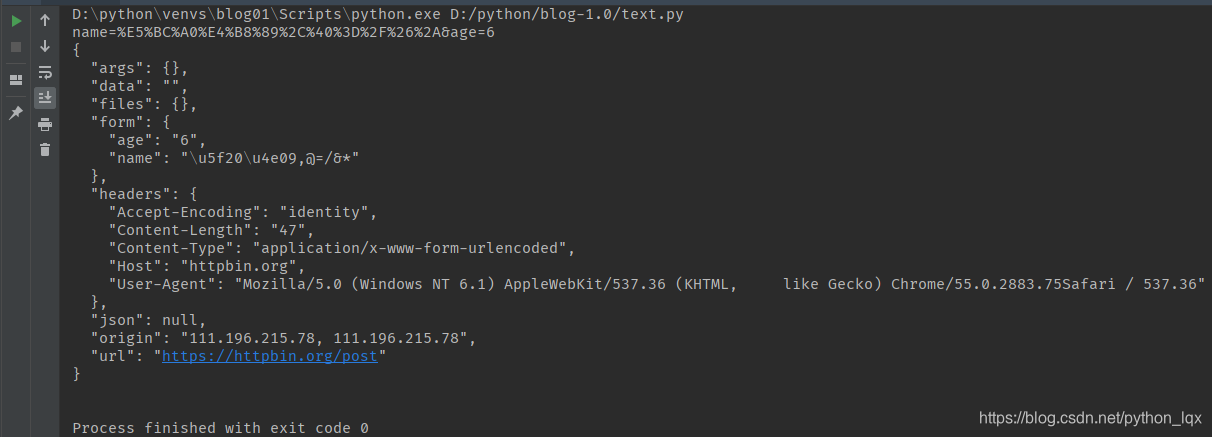
data = urlencode({'name':'张三,@=/&*', 'age':'6'})
print(data)
# res = urlopen(request, data='name=张三,@=/&*,&age=6'.encode()) # 不做url编码有风险
res = urlopen(request, data=data.encode()) # POST方法,Form提交数据
with res:
j = res.read().decode() # json
print(j)
处理JSON数据
查看“豆瓣电影”,看到“最近热门电影”的“热门”
通过分析,我们知道这部分内容,是通过AJAX从后台拿到的Json数据
访问URL是
https://movie.douban.com/j/search_subjects?type=movie&tag=%E7%83%AD%E9%97%A8&page_limit=50&page_start=0- utf-8编码的中文“热门”
服务器返回的Json数据如下
轮播组件,共需要50条数据
https://movie.douban.com/j/search_subjects?type=movie&tag=%E7%83%AD%E9%97%A8&page_limit=50&page_start=0
- tag 标签“热门”,表示热门电影
- type 数据类型,movie是电影
- page_limit 表示返回数据的总数
- page_start 表示数据偏移
1
2
3
4
5
6
7
8
9
10
11
12
13
14
15
16
17
18
19
20
21
22
23
24
25
26
27
28from urllib.request import Request, urlopen
from urllib.parse import urlencode
url = 'https://movie.douban.com/j/search_subjects'
request = Request(url)
request.add_header(
'User-agent',
"Mozilla/5.0 (Windows NT 6.1) AppleWebKit/537.36\
(KHTML, like Gecko) Chrome/55.0.2883.75Safari / 537.36"
)
data = urlencode({
'type': 'movie',
'tag': '热门',
'page_limit': 10,
'page_start': 10
})
# POST方法
res = urlopen(request, data=data.encode())
with res:
print(res._method)
print(res.read().decode())
# GET方法
with urlopen('{}?{}'.format(url, data)) as res:
print(res._method)
print(res.read().decode())
1 | POST |
HTTPS证书忽略
HTTPS使用SSL安全套接层协议,在传输层对网络数据进行加密。HTTPS使用的时候需要证书,而证书需要CA认证
- CA(Certificate Authority)是数字证书认证中心的简称,是指发放、管理、废除数字证书的机构
- CA是受信任的第三方,有CA签发的证书具有可信性。如果用户由于信任了CA签发的证书导致的损失,可以追究CA的法律责任
- CA是层级结构,下级CA信任上级CA,且有上级CA颁发给下级CA证书并认证
一些网站,例如淘宝,使用HTTPS加密数据更加安全1
2
3
4
5
6
7
8
9
10
11
12
13
14from urllib.request import Request, urlopen
# request = Request('http://www.12306.cn/mormhweb/') # 可以访问
# request = Request('https://www.baidu.com/') # 可以访问
request = Request('https://www.12306.cn/mormhweb/') # 报SSL认证异常
request.add_header(
'User-agent',
"Mozilla/5.0 (Windows NT 6.1) AppleWebKit/537.36 \
(KHTML, like Gecko) Chrome/55.0.2883.75Safari / 537.36"
)
# ssl.CertificateError: hostname 'www.12306.cn' doesn't match either of ......
with urlopen(request) as res:
print(res._method)
print(res.read())
通过HTTPS访问12306的时候,失败的原因在于12306的证书未通过CA认证,它是自己生成的证书,不可信。而其它网站访问,如 https://www.baidu.com/ 并没有提示的原因,它的证书的发行者受信任,且早就存储在当前系统中
使用ssl模块可忽略证书不安全信息1
2
3
4
5
6
7
8
9
10
11
12
13
14
15
16
17
18
19from urllib.request import Request, urlopen
import ssl # 导入ssl模块
# request = Request('http://www.12306.cn/mormhweb/') # 可以访问
# request = Request('https://www.baidu.com/') # 可以访问
request = Request('https://www.12306.cn/mormhweb/') # 报SSL认证异常
request.add_header(
'User-agent',
"Mozilla/5.0 (Windows NT 6.1) AppleWebKit/537.36 \
(KHTML, like Gecko) Chrome/55.0.2883.75Safari / 537.36"
)
# 忽略不信任的证书
context = ssl._create_unverified_context()
res = urlopen(request, context=context)
# ssl.CertificateError: hostname 'www.12306.cn' doesn't match either of ......
with res:
print(res._method)
print(res.read())
urllib3库
https://urllib3.readthedocs.io/en/latest/
标准库urllib缺少了一些关键的功能,非标准库的第三方库urllib3提供了,比如说连接池管理
安装$ pip install urllib31
2
3
4
5
6
7
8
9
10
11
12
13
14
15
16
17import urllib3
# 打开一个url返回一个对象
url = 'https://movie.douban.com/'
ua = "Mozilla/5.0 (Windows NT 6.1) AppleWebKit/537.36 \
(KHTML, like Gecko) Chrome/55.0.2883.75 Safari/537.36"
# 连接池管理器
with urllib3.PoolManager() as http:
response = http.request('GET', url, headers={
'User-Agent': ua
})
print(type(response)) // <class 'urllib3.response.HTTPResponse'>
print(response.status, response.reason) // 200 OK
print(response.headers)
print(response.data)
requests库
requests使用了urllib3,但是API更加友好,推荐使用
安装 $ pip install requests1
2
3
4
5
6
7
8
9
10
11
12
13
14
15
16
17
18
19
20import requests
ua = "Mozilla/5.0 (Windows NT 6.1) \
AppleWebKit/537.36 (KHTML, like Gecko) \
Chrome/55.0.2883.75Safari / 537.36"
url = 'https://movie.douban.com/'
response = requests.request('GET', url, headers={'User-Agent': ua})
with response:
print(type(response))
print(response.url)
print(response.status_code)
print(response.request.headers) # 请求头
print(response.headers) # 响应头
response.encoding = 'utf-8'
print(response.text[:200]) # HTML的内容
with open('d:/movie.html', 'w', encoding='utf-8') as f:
f.write(response.text) # 保存文件,以后备用

requests默认使用Session对象,是为了在多次和服务器端交互中保留会话的信息,例如cookie1
2
3
4
5
6
7
8
9
10
11
12
13
14
15
16
17
18import requests
ua = "Mozilla/5.0 (Windows NT 6.1) \
AppleWebKit/537.36 (KHTML, like Gecko) \
Chrome/55.0.2883.75Safari / 537.36"
urls = ['https://cn.bing.com/search?q=python', 'https://cn.bing.com/search?q=python']
session = requests.Session()
with session:
for url in urls:
response = session.get(url, headers={'User-Agent': ua})
# response = requests.request('GET', url, headers={'User-agent':ua}) # 观察两种方式区别
with response:
print(response.request.headers) # 请求头
print(response.cookies) # 响应的cookie
print(response.text[:20]) # HTML的内容
print('-' * 30)
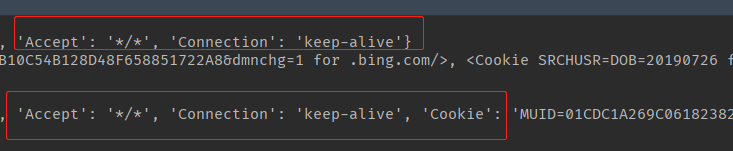
使用session访问,第二次带上了cookie